WolfLayer · Documentation
The operating layer for teams that work with AI.
WolfLayer brings conversation, AI reasoning, automation and small software into one realtime workspace. Teams talk, think with AI, build tools and automate work in the same place — and every piece of it stays connected.
Surfaces
6
conversation types — channels, DMs, AI canvases and workflow spaces
Products
2
WolfLayer Workspace for teams, WolfLayer Business for local companies
Agent runtime
1
shared brain behind web, WhatsApp and every future interface
Permissions
32
granular permissions across five roles, enforced in the database
You focus on people and value. We handle the software, intelligence, and infrastructure.
The problem
AI made individuals faster. It made teams more scattered.
A typical team now runs its day across a chat tool, a separate AI assistant, an automation product, a meeting tool, a document store and a handful of one-off scripts. Each one is good on its own. None of them share context.
Context dies in tabs
The useful AI conversation happens in a private window and never reaches the team that needs it.
Linear chat breaks thinking
Exploring two ideas in one AI thread pollutes both. Real reasoning branches; chat interfaces don’t.
Automation is a separate job
Turning “we keep doing this” into a workflow means leaving the conversation and learning another tool.
The result is lost decisions, duplicated work and AI spend that never compounds into team knowledge.
Our approach
One workspace. Thinking, building and doing on the same canvas.
WolfLayer is designed around four principles that shape every feature.
1 · Conversation is the interface
Every capability — AI, workflows, mini-apps, meetings — starts from, and returns to, a conversation.
2 · Reasoning branches
AI threads are trees, not lines. Each branch keeps exactly its own context, so ideas never leak.
3 · Plain language builds software
Describe a workflow or a tool and WolfLayer generates it, runs it and lets you refine it in place.
4 · Agents ask before they act
Anything that sends, posts or pays stops for human approval. Reversible actions just happen.
Product · Workspace
A realtime workspace built for humans and AI
The foundation is a fast, realtime team chat: a global room, topic channels, private direct messages, presence, unread counts and instant search (⌘K). Messages carry rich attachments — GitHub repositories, YouTube videos with AI summaries, Google Meet invites, documents and live mini-apps.
| Channel type | What it is for | Status |
|---|---|---|
| Global & channels | Team rooms with open or approval-based joining and owner / admin / member roles | Live |
| Direct messages | Private 1:1 conversations with the same rich attachments | Live |
| Collabo | Branching AI conversation canvas and tree view | Live |
| Collabo Space | Visual workflow builder generated from plain language | Beta |
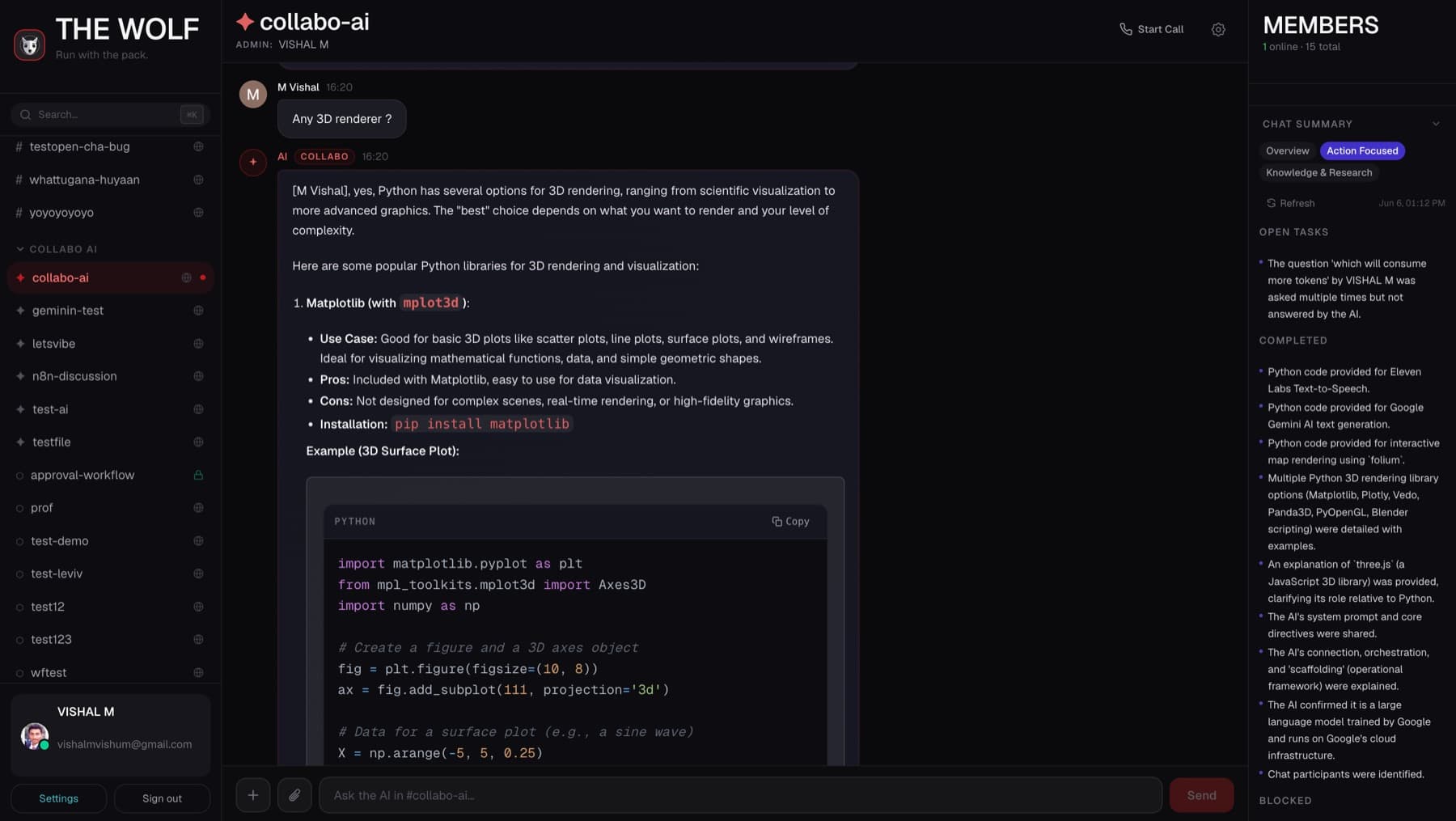
AI chat summaries let anyone catch up on a long channel in seconds, in three views from a single generation: an overview, an action list, or a research digest.
Product · Collabo
AI conversations that branch like thought
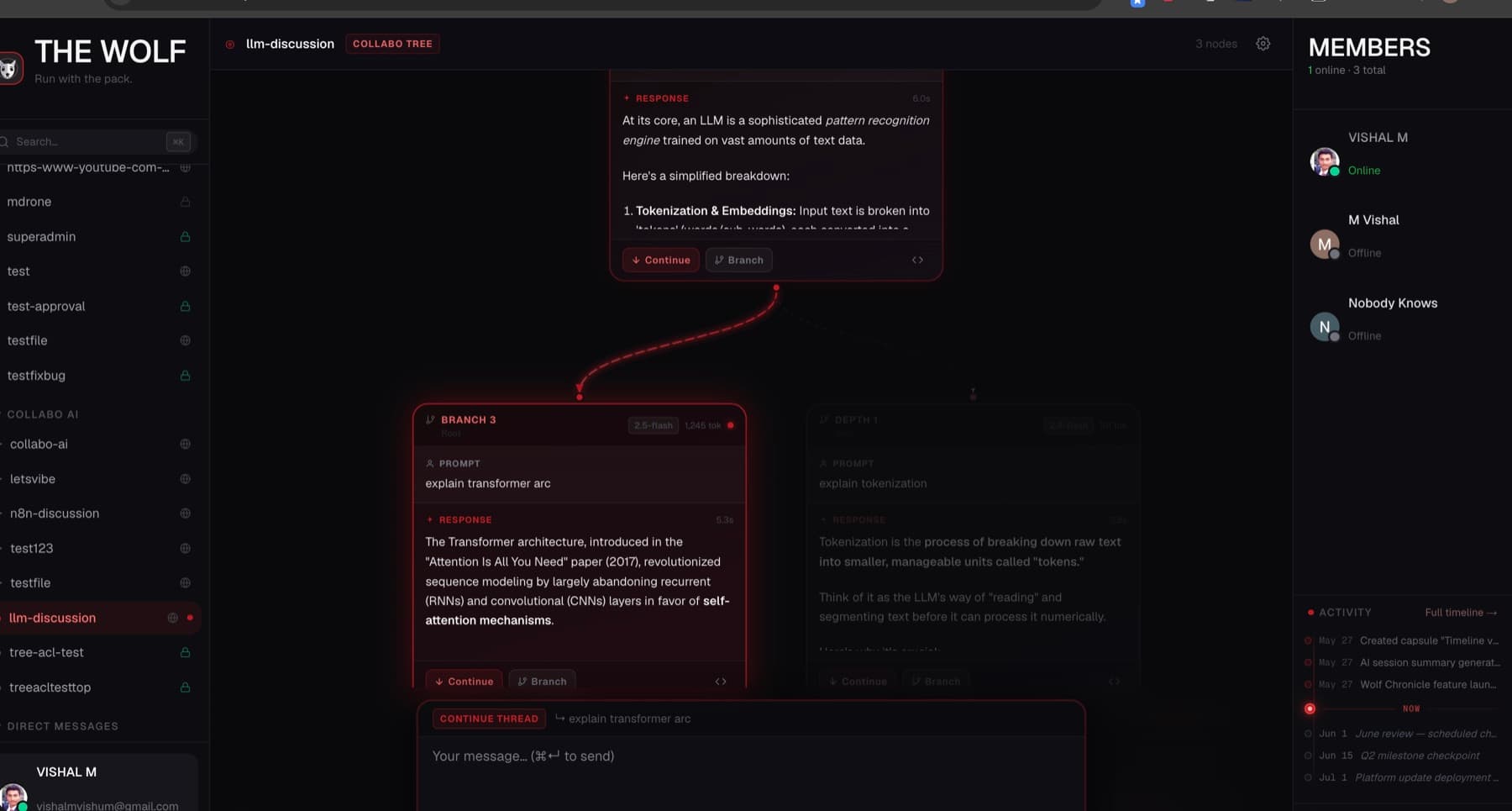
Collabo replaces the linear AI chat with an infinite canvas of conversation nodes. Every node is one exchange. Continue from any node, or branch from it to explore an alternative — each branch sees only the chain that leads to it, so parallel lines of reasoning never contaminate each other.
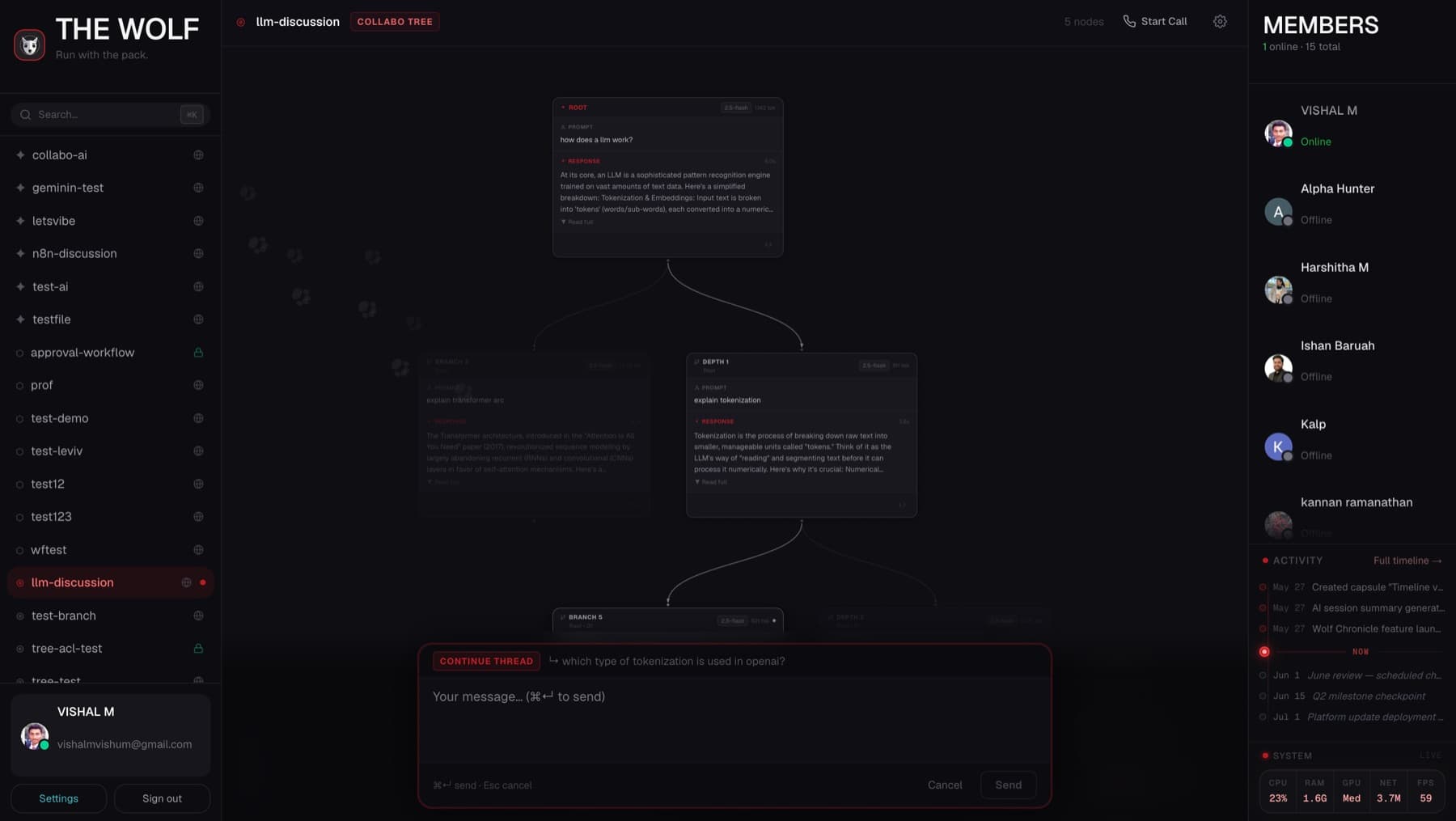
- Canvas and Tree modes. Spatial canvas for exploration; an animated branch graph with a split-panel chat for navigating deep conversations.
- Lineage panel. See the exact context the model is working with — every ancestor from root to the selected node.
- Transparent by default. Each node records model, token count and latency.
Product · Collabo Space
Describe the outcome. Get a running workflow. Beta
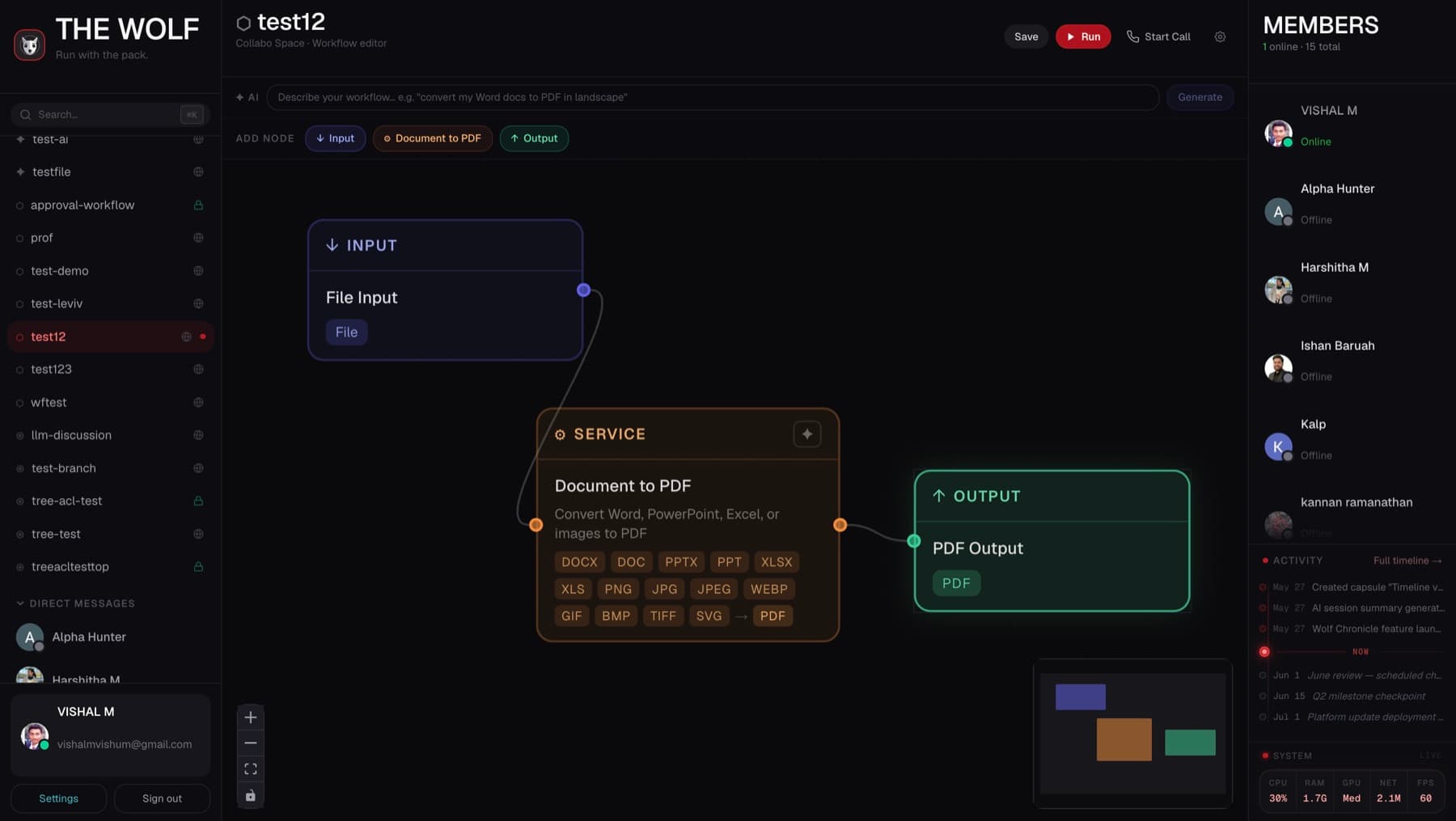
Collabo Space turns a sentence like “Convert my Word document to PDF in A4 landscape” into a connected graph of input, service and output nodes on a visual canvas. Inspect any node, tune its parameters without regenerating, upload an input and run it — progress is tracked step by step.
Product · Capsules
Software small enough to send in a message
Capsules are interactive mini-apps generated from a description and embedded directly in the chat feed — calculators, visualisers, timers, boards. Ask for a change in plain language and the capsule rebuilds itself. Publish it and everyone in the conversation can run it.
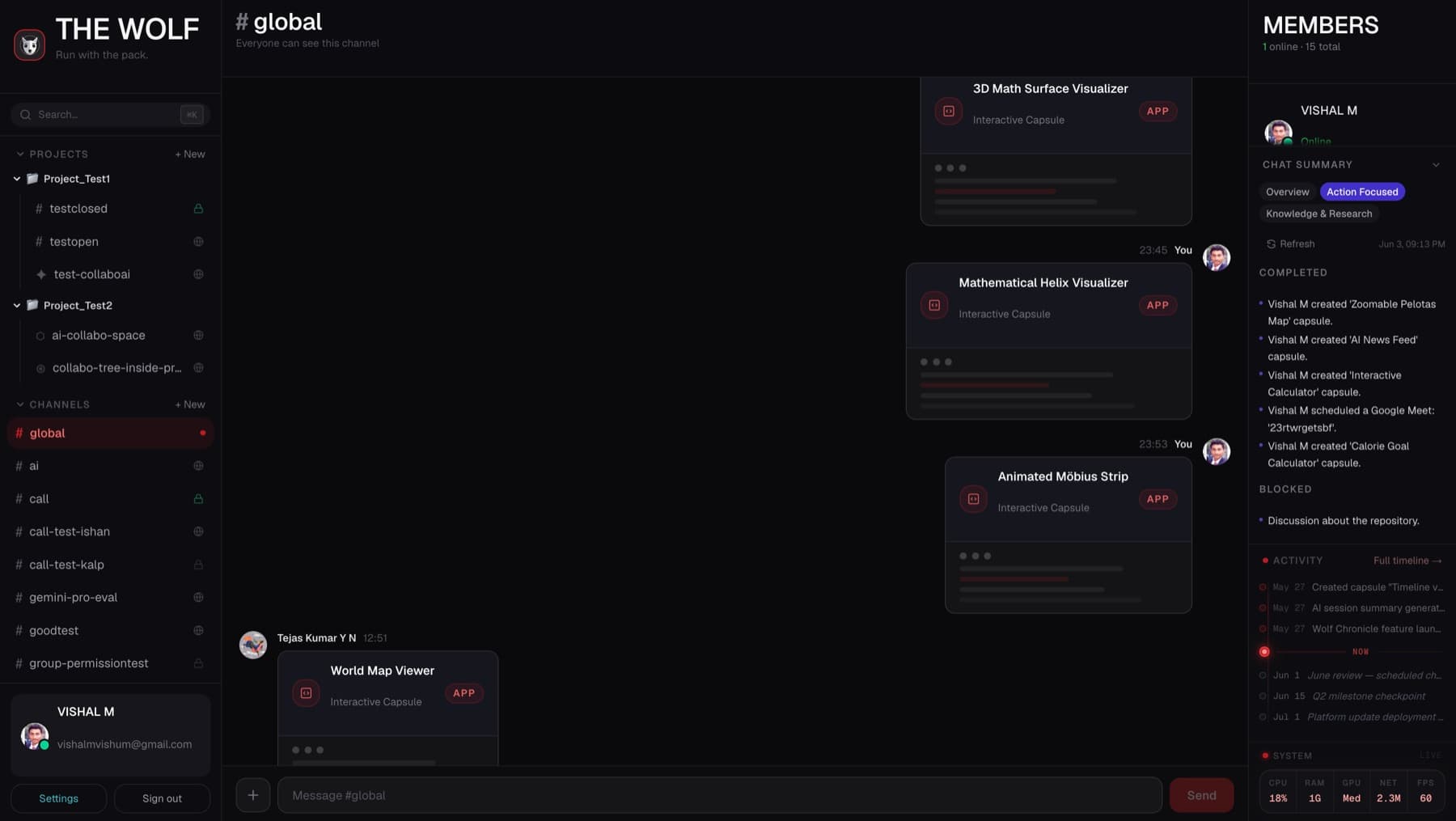
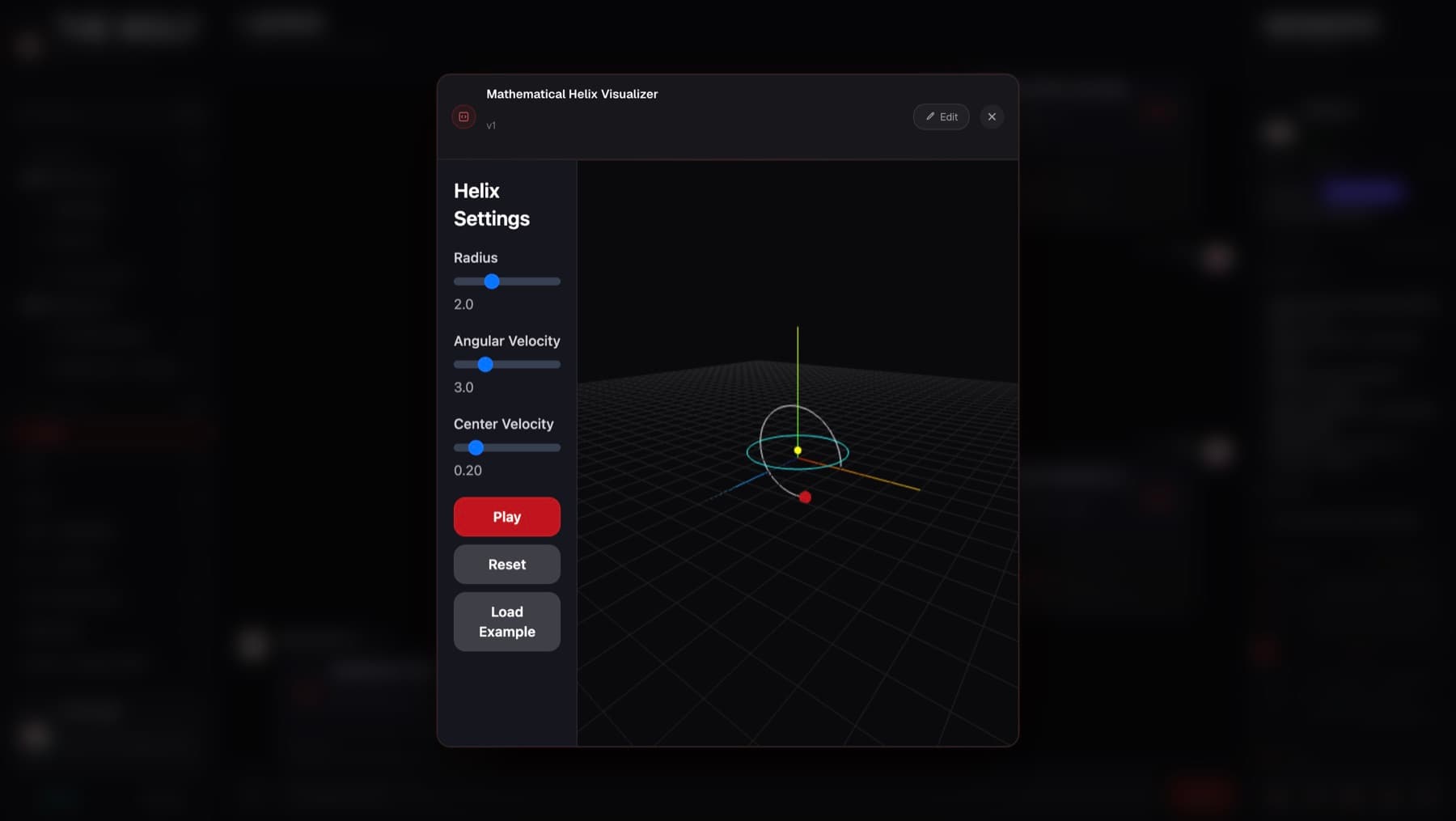
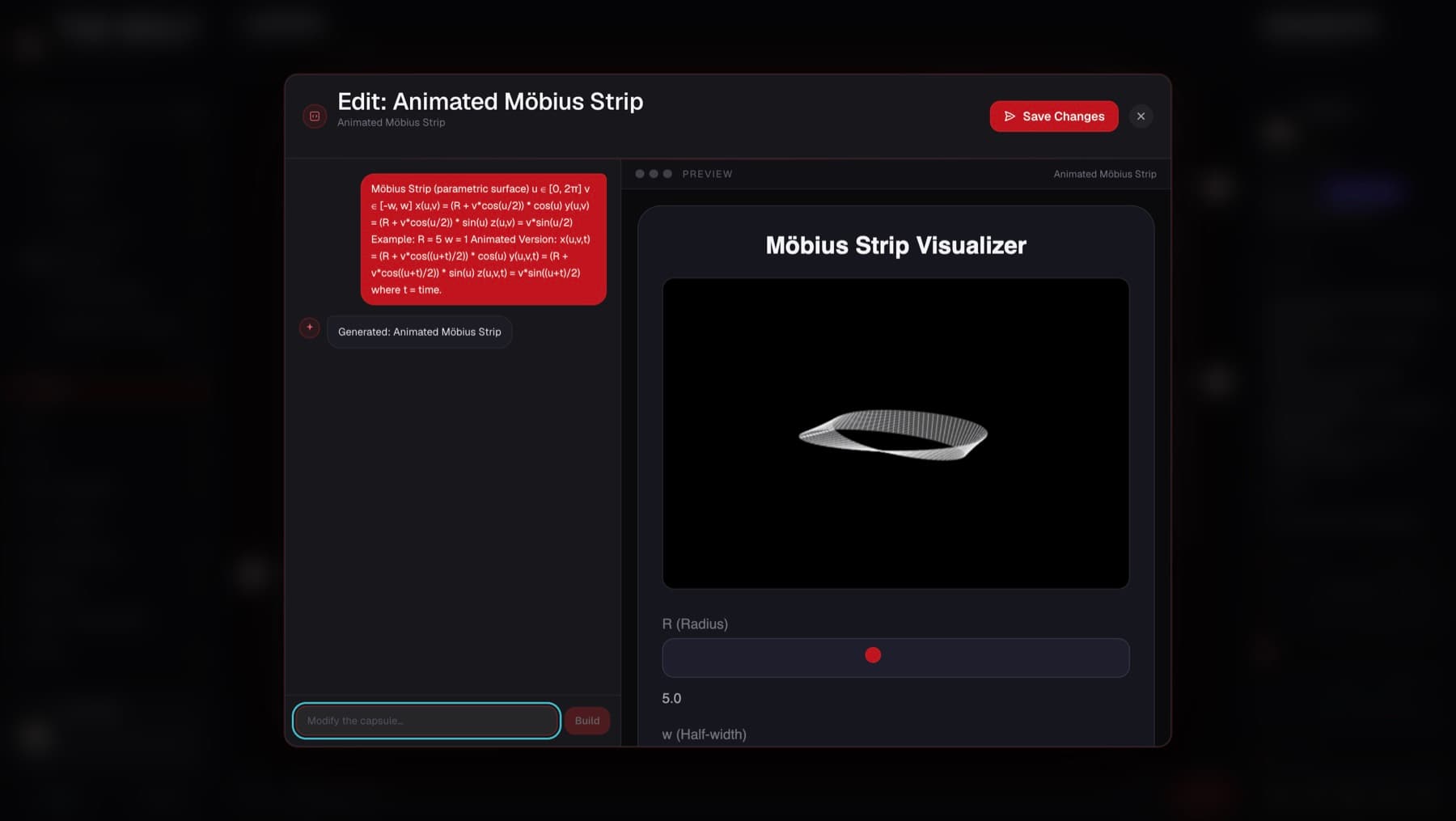
Capsules run in a sandboxed iframe with no access to the surrounding page or user data, and expose a small SDK for downloads and key/value storage.
Product · Agent OS
Agents that plan, ask, and then act Beta
Under the product sits an agent operating system. Every interface — the web app today, WhatsApp and voice next — talks to one agent runtime. Interfaces contain no business logic, so a capability built once is available everywhere.
First use case: a personal Gmail assistant
| You say | The runtime plans | Approval |
|---|---|---|
| “Summarise today’s emails” | search → read → summarise | Not needed |
| “Reply politely” | search → read → compose → reply | Stops before sending |
| “Archive promotions” | search → archive | Reversible, runs |
The proactive loop
Triggers watch for events — for example, new mail matching a saved instruction — and start an ordinary agent run with no human turn. The result lands in the user’s real WhatsApp thread (“Invoice from AWS, $412.80, due 15 Aug”). A two-word reply such as “archive it” resolves against the same conversation and the agent completes the job. There is no special “proactive mode”; it is the same runtime, which is the test that the architecture is right.
- The planner cannot execute. Plans and actions are separate by construction.
- Approval follows the tool, not the prompt. Tools declare side effects; external sends always pause.
- Runs are resumable. An approval can arrive minutes later from a phone and the run continues.
- Noise is a platform policy. Cooldowns, daily caps and quiet hours apply to every trigger.
Product · Integrations
Connected to where work already lives
GitHub Live
Attach repository cards to any message. Read-only OAuth; tokens stay server-side.
Google Calendar & Meet Live
Create a calendar event with a Meet link from the composer and share it as a rich card.
YouTube Live
Share a video and get chapter summaries plus a chat that answers questions from the transcript.
Gmail & WhatsApp Beta
Agent tools for reading, summarising, replying and archiving, with alerts on WhatsApp.
Group voice calls Live
Realtime calls for up to 10 people with speaking indicators. The call follows you across channels.
Notifications Live
In-app toasts, browser and push notifications with per-type preferences and throttling.
Product · WolfLayer Business
A complete digital front office for local businesses Beta
WolfLayer Business packages the same platform for cafés, studios, clinics and agencies. In one afternoon a business gets a website, digital business cards, a customer inbox, social publishing and an AI assistant that knows its products — without hiring an agency or stitching five subscriptions together.
| Module | What the business gets |
|---|---|
| Website | Themed site on its own subdomain or custom domain, draft/publish, SEO, Open Graph and structured data |
| Cards · QR · NFC | Permanent card links that always point to the current address — renaming never breaks a printed card |
| CRM & inbox | Website forms, card pages and the chatbot all create a customer, enquiry and conversation |
| Social publishing | Instagram and YouTube from one calendar, with approval before anything is posted |
| AI content studio | On-brand posts and copy in nine languages; output always goes to the editor first |
| Chatbot & knowledge | Upload PDFs and documents; the website assistant answers from them and hands off to a human |
| Analytics | Cookieless, privacy-first visitor analytics that honours Do-Not-Track and GPC |
| Team & roles | Owner, Administrator, Manager, Employee and Viewer, with per-member permission overrides |
Plans
Your business online, in one afternoon.
- One business website
- Digital business card
- QR codes
- Basic analytics
For teams that meet customers every day.
- NFC card support
- Themes & customisation
- Team of up to 10
- CRM & inbox
Publish everywhere from one calendar.
- Instagram & YouTube
- Content calendar
- 200 AI generations / mo
- Team of up to 25
An assistant that knows your business.
- AI website chatbot
- Knowledge base
- Advanced analytics
- 1,000 AI generations / mo
Every new workspace starts on a free trial of Business AI. Billing runs on Stripe; plan changes take effect only from verified Stripe events.
Platform · Architecture
One runtime behind every interface
WolfLayer is built as a platform, not a set of features. Interfaces are thin. A single agent runtime owns planning, memory, tool execution and approvals, and every action it takes is published to an event bus that feeds the knowledge graph.
| Layer | Technology |
|---|---|
| Application | Next.js 16, React 19, TypeScript, Tailwind 4 |
| Data & realtime | Postgres with row-level security, realtime subscriptions, pgvector embeddings |
| Knowledge graph | KuzuDB graph engine with a Postgres entity index |
| AI | Google Gemini today; provider-agnostic model layer for multi-model routing |
| Background work | Dedicated workers with row-locked job claiming, backoff and idempotency keys |
| Ingestion | Document service converting PDF, Office, HTML and audio into structured text |
| Voice | WebRTC with realtime signalling and voice-activity detection |
| Hosting | Containerised services on Railway, multi-host routing for every product |
One deployment serves the whole ecosystem by hostname — the team workspace, the Business dashboard, every tenant website and the permanent card redirect service — with strict isolation between them.
Platform · Security & privacy
Isolation is enforced by the database, not by convention
We treat customer data as the product’s foundation. Security is designed in layers so that a mistake in one layer is caught by the next.
Three-layer tenant isolation
Composite foreign keys make cross-tenant links impossible in Postgres itself; row-level security on every table; and feature code only ever receives a data client bound to one tenant.
Encrypted credentials
OAuth tokens and API keys are encrypted at rest with AES-256-GCM, stored server-side and never exposed to the browser.
Bring your own key
Workspace AI runs on the customer’s own model key, validated before saving and encrypted. Teams keep control of their AI spend and data agreements.
Human-in-the-loop by design
Agents and publishing queues require approval before any external send. Reversible actions run; irreversible ones wait.
Privacy-first analytics
No cookies, no stored IP addresses or user agents, daily-rotating visitor hashes, and respect for Do-Not-Track and Global Privacy Control.
GDPR tooling built in
Data-subject export and erasure, full workspace export, retention controls, account deletion and an audit log.
Every dashboard action passes the same gate in order: same-origin check, session, membership, permission, plan entitlement, then schema validation. An action cannot be registered without declaring the permission it needs. The platform completed an internal security audit and remediation in October 2026.
Company · Why now
The tools were built for a world before agents.
- AI is now a team member, not a tab. Models are capable enough to plan and use tools, but they still live in single-player interfaces with no shared context.
- Software creation collapsed to a sentence. When a workflow or a tool can be generated in seconds, the place it should live is where the need was spoken — the conversation.
- Small businesses are underserved. They need the same AI leverage as enterprises, but buy outcomes — a website, more bookings, fewer emails — not platforms.
How WolfLayer compares
| Capability | Team chat | AI assistants | Automation tools | WolfLayer |
|---|---|---|---|---|
| Realtime team conversation | ✓ | — | — | ✓ |
| Branching, shared AI reasoning | — | Single-player | — | ✓ |
| Workflows from plain language | — | — | Separate tool | ✓ |
| Mini-apps inside messages | — | — | — | ✓ |
| Approval-gated agents | — | Partial | Partial | ✓ |
Where the moat compounds
Every message, branch, workflow run and agent action flows through one event bus into a workspace knowledge graph. The longer a team uses WolfLayer, the more its agents know about its people, decisions and processes — context that cannot be exported to a point tool. Capsules and workflows add a second compounding loop: reusable building blocks that will grow into a shared marketplace.
Company · Business model
Two products, one platform cost base
WolfLayer Workspace
Teams and knowledge workers
Closed alpha today. Bring-your-own-key AI keeps gross margins independent of model costs. Paid workspace plans arrive with general availability.
WolfLayer Business
Local and small businesses
Self-serve subscriptions from €9.99 to €99.99 per month with metered AI usage, Stripe billing and a free trial of the top plan to drive upgrades.
Both products run on the same deployment, database and agent runtime. Each new capability — a tool, a connector, an agent — ships once and serves both markets.
Company · Roadmap
What we are building next
Priorities can shift with what we learn from customers. This is the current direction.
Now Live
- Gmail agent with WhatsApp alerts
- Business general availability
- Workflow triggers: schedule, webhook, events
- Full message history
Next Beta
- Project knowledge base with citations
- “Ask WolfLayer” workspace search
- Conversation → workflow in one click
- Multi-model AI routing
Later Roadmap
- Meeting intelligence and transcripts
- Workflow & capsule marketplace
- Video calls and screen sharing
- Mobile app and public API
Company · Team
Built end to end by its founder
Vishal Mahesh Kumar — Founder & CTO
Engineer and product builder. Three years in enterprise R&D at Flexera, where he led a 70% architecture redesign that moved ETL workloads to AWS, built API layers that cut customer-side load, and prototyped AI-assisted enterprise workflows. Now studying M.Sc. Management & Engineering at RWTH Aachen. Designed, built and operates every layer of WolfLayer — from database security to the agent runtime and the product itself.
Connect on LinkedIn ↗FAQ
Frequently asked questions
How do I get access?
WolfLayer Workspace is in closed alpha. Sign in with Google on the home page; if your email is not yet on the access list you will see an invite-only screen. Reach out on LinkedIn to request access.
Which AI models does WolfLayer use?
Workspace AI runs on Google Gemini with your own API key. The model layer is provider-agnostic, and multi-model routing is on the roadmap.
Can an agent send an email or post without me?
No. Any tool with an external side effect — sending, replying, publishing — pauses for your approval. You can approve from the web or from your phone.
Where is my data stored, and is it used to train models?
Data is stored in Postgres with row-level security and encrypted credentials. It is never sold. Because AI runs on your own key, prompts are governed by your agreement with the model provider.
Is WolfLayer GDPR-compliant?
WolfLayer is built in Germany with GDPR tooling in the product: data export and erasure, retention controls, account deletion, audit logs and cookieless analytics. A full privacy policy will be published before general availability.
Can I use my own domain for a Business website?
Yes. Every business gets a subdomain on wolflayer.app, and verified custom domains are supported. Cards and QR codes keep working even if the address changes.
Run with the pack.
Join the closed alpha, or talk to us about WolfLayer for your business, a pilot, or an investment conversation.